HomeFeaturesPricingIndustriesBlogAboutContact
Sign inBook a demo
CabiPro mobileiOS & Android

The job site,
in your pocket.

CabiPro for iPhone, iPad and Android is the field half of your workshop. Capture site, measurement, delivery and installation photos against the right lot, lodge expense and mileage claims before you leave the driveway, and work through the install checklist on the phone in your hand.

  • Free to download
  • Requires iOS 16.4 or later
  • Requires Android 7.0 or later
  • Built for phones and tablets
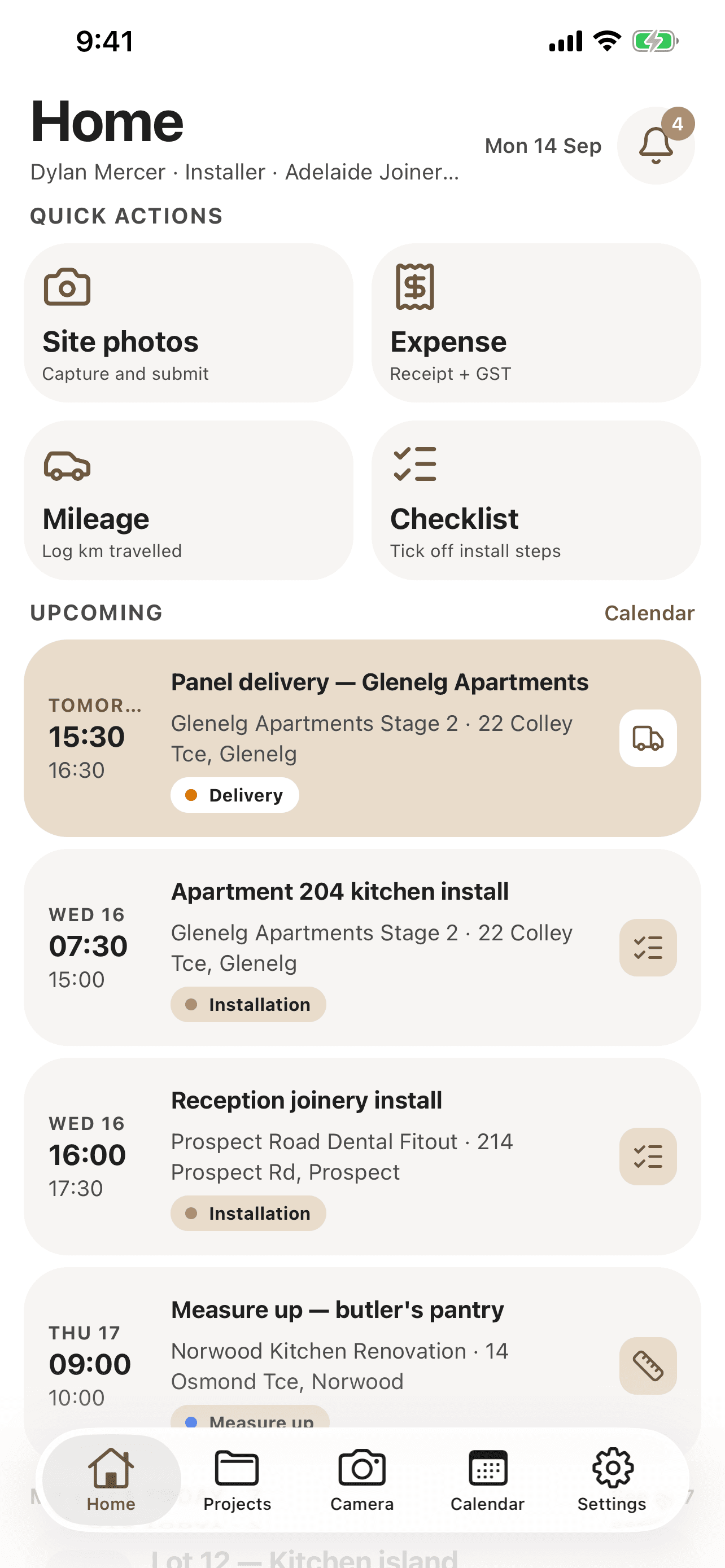
CabiPro Home screen on iPhone: quick actions for site photos, expenses, mileage and checklists, above the installer's upcoming deliveries and installs for the week.
Away from the desk

Half the job
happens on site.

The measure up, the delivery, the install, the handover - none of it happens in front of a computer. So it gets photographed on a personal phone, written on the back of a docket, and typed up days later by whoever can still remember it.

  • Photos never make it backthey sit in a camera roll, or arrive by text with no job attached.
  • Receipts go missingthe claim gets reconstructed at month end, or quietly written off.
  • The office is guessingnobody knows a lot is finished until someone gets back and says so.
What the app takes off the ute dashboard
  • Install photos, filed against the lot
  • Receipts for materials and hardware
  • Kilometres between the yard and site
  • Which install steps are actually done
  • Notes the crew left for the next shift
  • Whether a claim was ever approved
Inside the app

Four screens.
All of the field work.

No dashboards to configure and no menus to learn. The app opens on what is due today and everything else is a tab away.

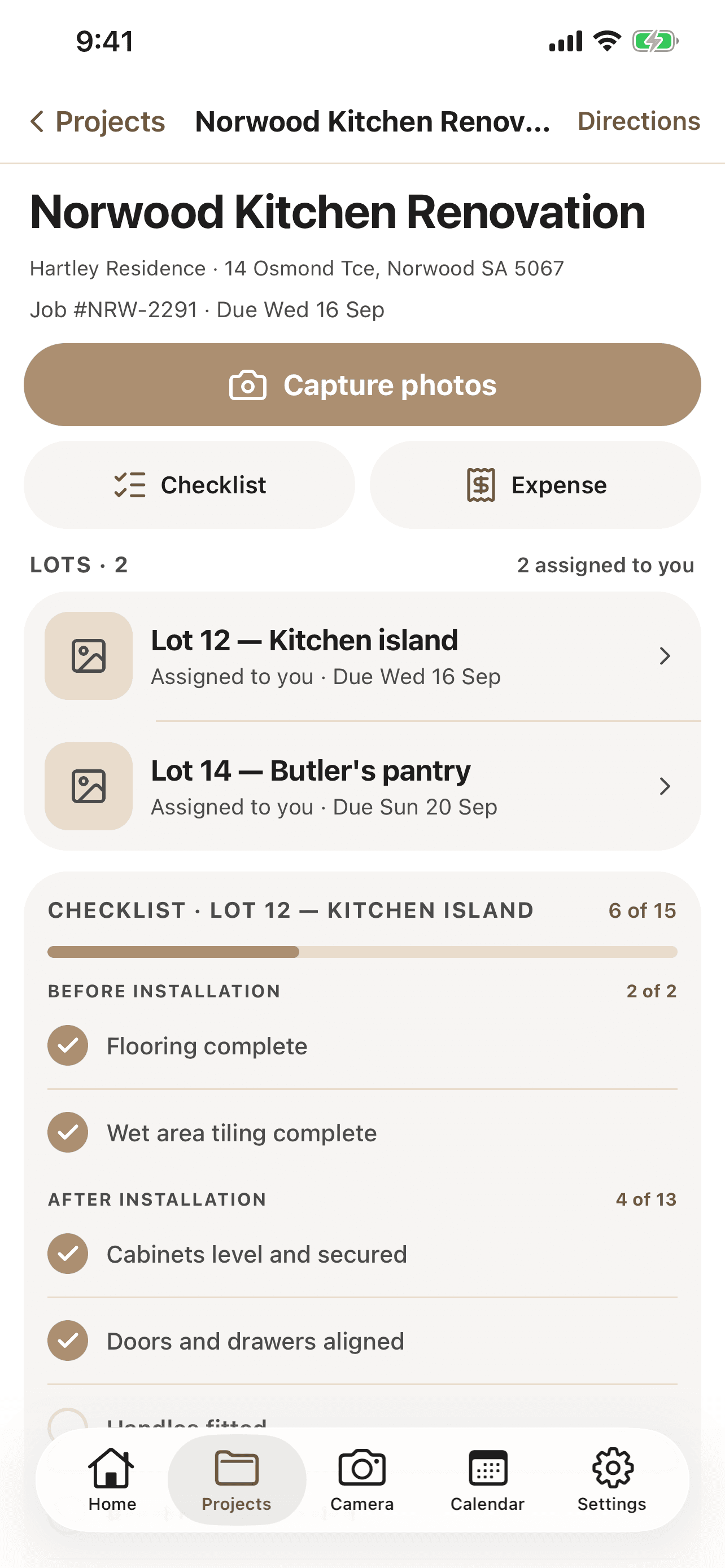
  • CabiPro job screen on iPhone showing the Norwood Kitchen Renovation, its two assigned lots, and an install checklist six steps of fifteen complete.

    Lots and checklists

    Open a job, see the lots assigned to you, and tick off the install checklist as you go.

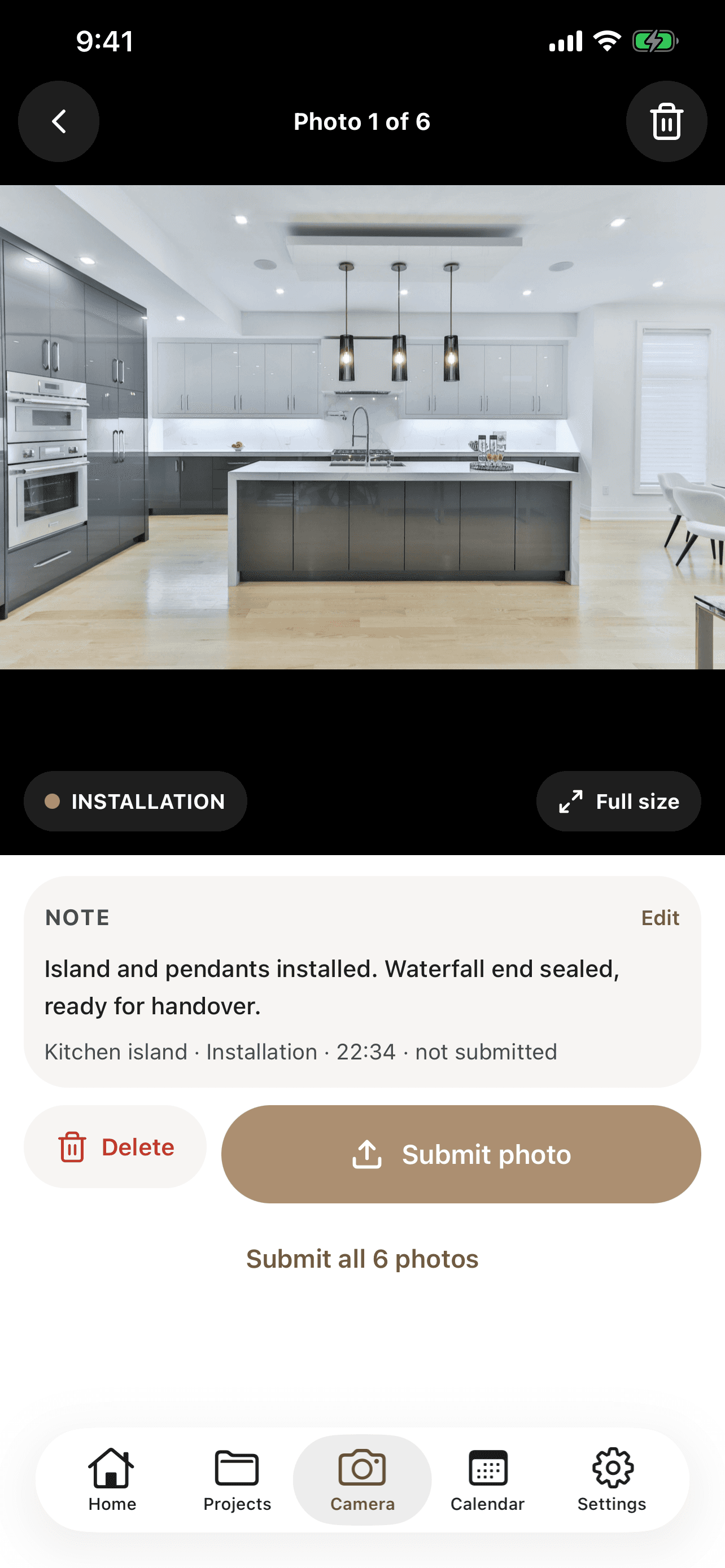
  • CabiPro camera screen on iPhone previewing an installed kitchen island photo, with a note attached and a submit photo button.

    Capture and submit

    Shoot the photo, add the note, file it against the right lot. Six at a time if you like.

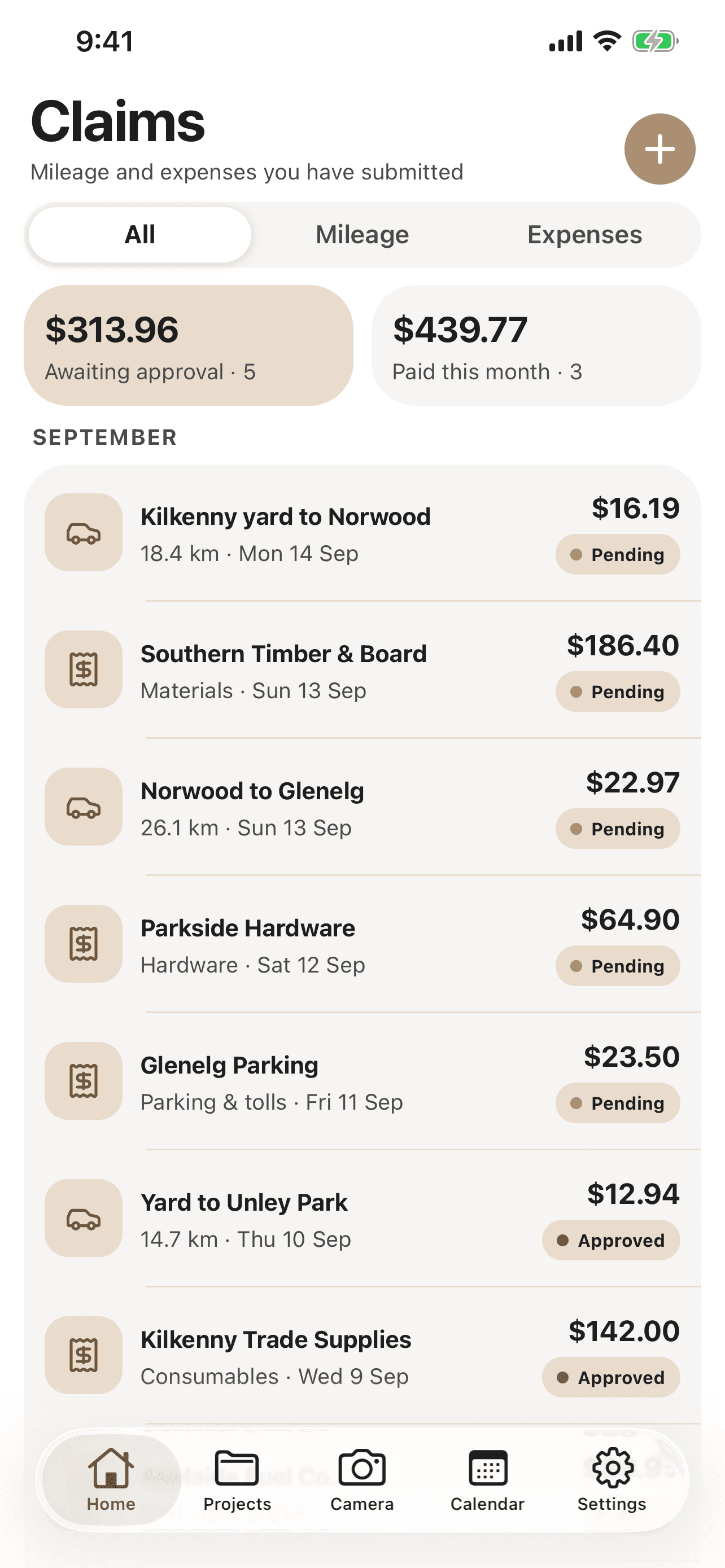
  • CabiPro claims screen on iPhone listing mileage and expense claims for September with pending and approved status badges, and totals awaiting approval.

    Claims

    Mileage and expenses in one list, tracked from submitted through to reimbursed.

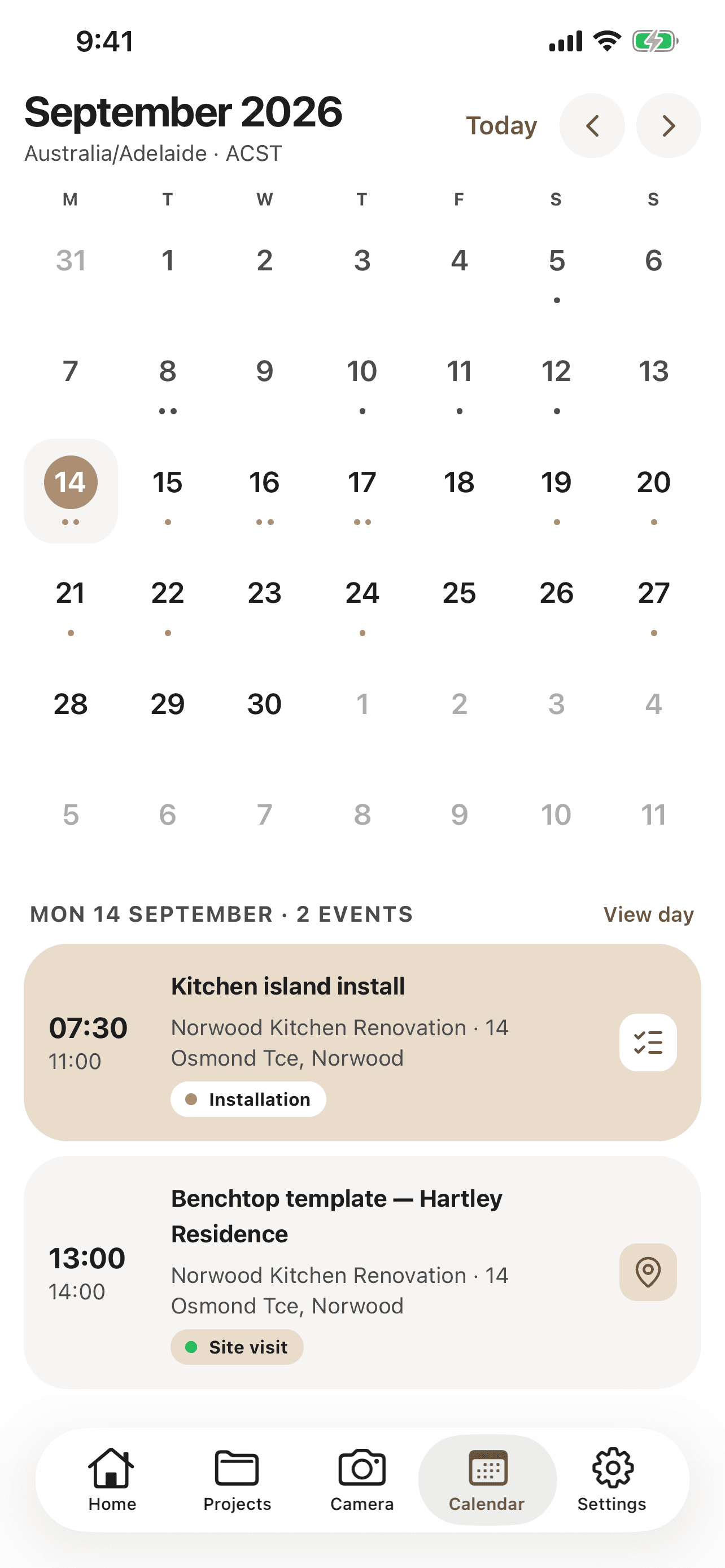
  • CabiPro calendar screen on iPhone showing September 2026 in month view with two events on the selected day: a kitchen island install and a benchtop template site visit.

    Schedule

    Installs, deliveries, measure ups and site visits, in the same calendar as the office.

What it does

Built for the ute,
not the boardroom.

Every screen is something an installer actually needs mid-job, reachable with one thumb while the other hand is holding a level.

01

Photos, filed as you shoot them

Site, measurement, delivery and installation photos taken against the right lot, from the job. They land in the same document tabs the workshop already uses, so nothing needs re-filing on Monday.

  • Tagged by lot and photo type as you shoot
  • Add a note before it leaves your hand
  • Submit one photo or the whole batch
  • Visible to the office the moment it lands
02

Expense claims from the driveway

Photograph the receipt, pick the category, lodge the claim. No shoebox of dockets, no end-of-month reconstruction of what that $186 at the timber yard was actually for.

  • Receipt photo attached to the claim
  • GST captured at the point of spend
  • Categorised as materials, hardware or tolls
  • Submitted, approved and reimbursed states
03

Mileage worked out for you

Log the trip and CabiPro calculates the amount from the distance and the rate your organisation has set. The same rate for every installer, applied the same way every time.

  • Distance in, dollar figure out
  • Uses your organisation rate, not a guess
  • Sits alongside expenses in one claims list
  • Monthly totals at a glance
04

The lots assigned to you

Due dates, production stages and the notes left for the crew, for the lots that are actually yours. Not the whole job board, and not a printout from yesterday.

  • Only the lots you are on
  • Live production stage and due date
  • Notes left for the crew, in context
  • Photo history for the lot alongside it
05

Install checklists on site

Work through before and after installation steps on the phone in your hand, and finish the maintenance checklist on a completed site without carrying paper back to the office.

  • Before and after installation sections
  • Progress counted as you tick
  • Maintenance checklist for completed sites
  • Becomes the handover record for the client
06

Schedule and updates in your pocket

The calendar the office schedules against, plus announcements and the activity that concerns you - a lot you have been added to, a delivery moved, a claim approved.

  • Installs, deliveries and measure ups
  • Announcements from the workshop
  • Told when a claim is approved or paid
  • Addresses tap straight through to directions
Designed for iPad

A tablet layout,
not a stretched phone.

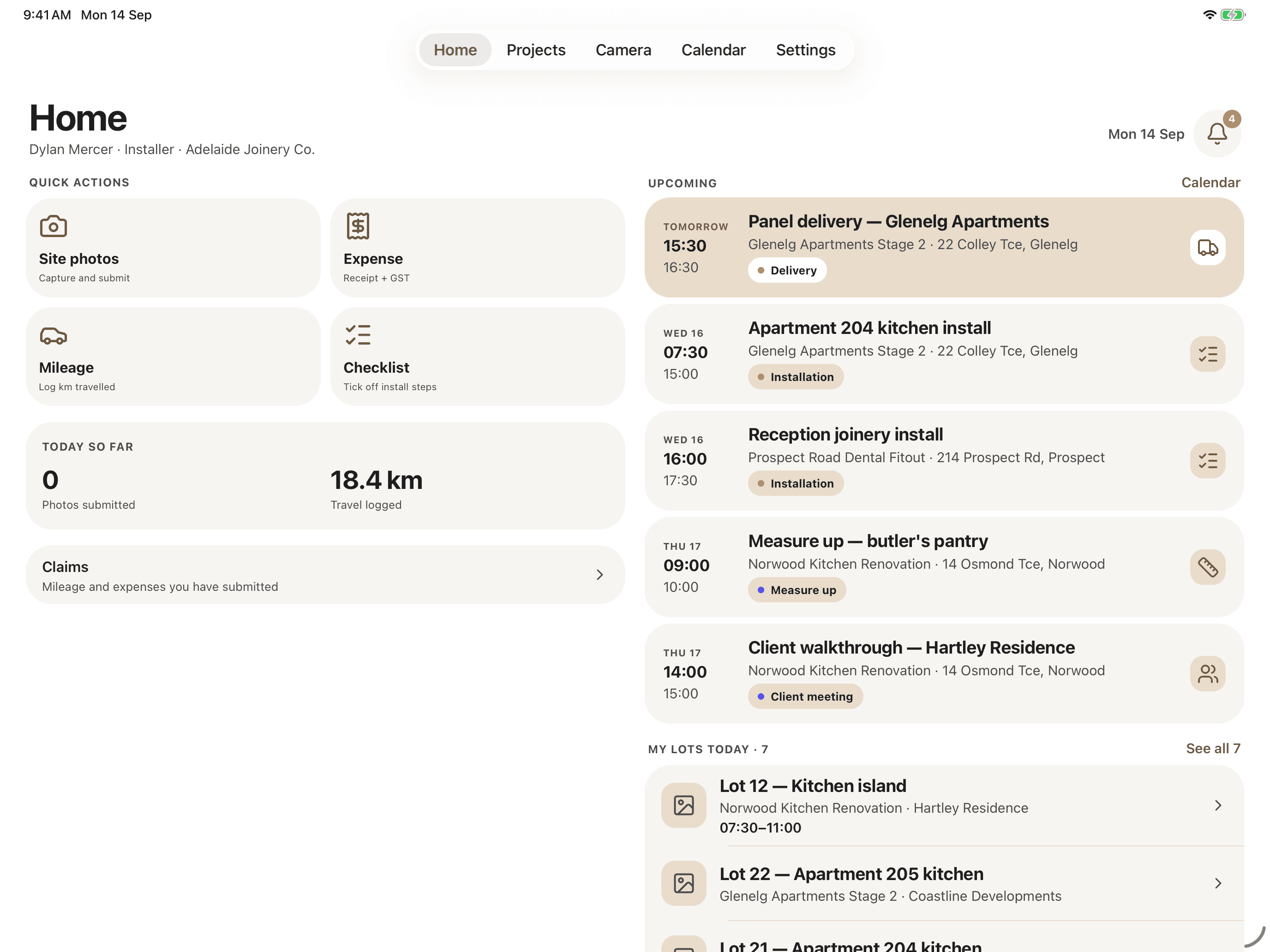
On iPad the app spreads into two columns, so a foreman running a site can keep the day and the assigned lots on screen at once. Same account, same records, more room to work.

  • Two-column homequick actions and the day beside the full run of upcoming work.
  • Bigger photo reviewcheck an install shot properly before it is submitted.
  • Same loginphone, tablet and the browser all read the one set of records.
CabiPro Home screen on iPad, laid out in two columns: quick actions and the day's totals on the left, upcoming jobs and assigned lots on the right.
The same Home screen, rebuilt for the bigger display.
Getting started

Three steps,
then back to work.

  1. 01

    Download it free

    From the App Store or Google Play. The app itself costs nothing - it is included with your CabiPro subscription.

  2. 02

    Sign in with your CabiPro account

    The same login your crew already uses on the web. Roles and permissions carry across, so people see the lots they are on and nothing else.

  3. 03

    Hand it to the crew

    Installers, measure-up staff and site foremen get the field half of CabiPro. The office keeps working in the browser on the same records.

Free downloadOn the App Store and Google Play
Works where you workBuilt for phones on real job sites
No second systemThe same records as the browser
Mobile app FAQ

Before you
hand out phones.

Does the app cost anything?

No. The app is free to download and is included with your CabiPro subscription at no extra charge. There is no separate mobile licence and no per-device fee.

Do I need a CabiPro account to use it?

Yes. The app is the field half of the CabiPro platform rather than a standalone product, so it needs an active CabiPro organisation account to sign in to. If you do not have one yet, you can start a free 14-day trial at cabipro.com.

Which devices does it run on?

iPhone and iPad running iOS 16.4 or later, from the App Store, and Android phones and tablets running Android 7.0 or later, from Google Play. The tablet builds are proper tablet layouts rather than a stretched phone screen, so a foreman can work off a tablet on site.

Is it available on Android?

Yes. CabiPro is on Google Play for Android phones and tablets running Android 7.0 or later. It is the same app as on iPhone and iPad and signs in with the same CabiPro account.

What does the office see?

Everything captured on the phone lands in the same records the workshop already works from. Photos appear in the document tabs on the lot, and claims arrive in the approval queue for whoever signs them off.

Can the whole business run from the app?

No, and it is not meant to. Quoting, material takeoffs, purchase orders, inventory, supplier statements, client invoicing and the Xero connection all live on the web at cabipro.com. The app covers the parts of the job that happen away from the desk.

Put it in their hands.

Free to download, included with your CabiPro subscription, and on the crew's phones this afternoon.

The app requires an active CabiPro organisation account - it is the field half of the platform, not a standalone product. Book a demo or start a free 14-day trial.

Cookies

We use essential cookies to keep CabiPro working. Google Analytics and advertising cookies help us see how the site is used โ€” they stay off until you say yes. Privacy policy